
Finding the Resolution of your Screen
There are 2 basic ways of finding what resolution your laptop screen has:
First Method
The first way requires that your original screen is still in somewhat working condition (enough for you to make out a picture on the screen).
If you have internet access: go to this page to reveal your screen resolution
If do you not internet access,
you can find the resolution by folowing these steps
- For Windows XP/Server 2003: Right-Click on Desktop -> Properties -> then in Display Properties navigate to Settings
- For Windows Vista/7/8/10: Right-Click on Desktop -> Personalize -> Graphics Options
Second Method
This method requires you to look at the back of your ORIGINAL screen to find the model number of your screen.
The first 1-3 letters of the model number usually indicates the manufacturer of the screen. Here is a table of manufacturers and their corresponding naming scheme:
Acer - L
AU Optronics - B
Chi Me - N
Chunghwa - CLAA
HannStar - HSD
Hitachi - TX
IBM ( IDTech) - IT or IA
LG Philips - LP
LG Display - LP
Matsushita - ED
Mitsubishi - AA
NEC - NL
Quanta - QD
Samsung - LT or LTN
Sharp - LQ or LM
Sanyo / Torisan - TM or LMJK
Toshiba - LTM or LTD
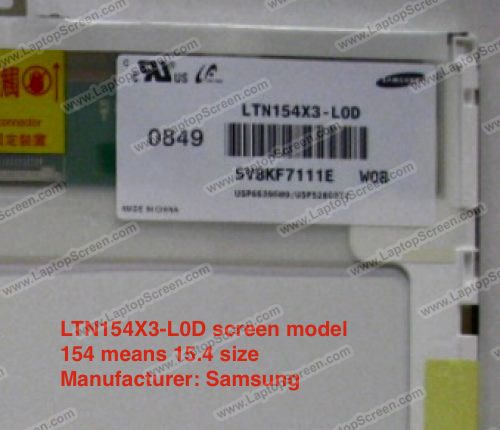
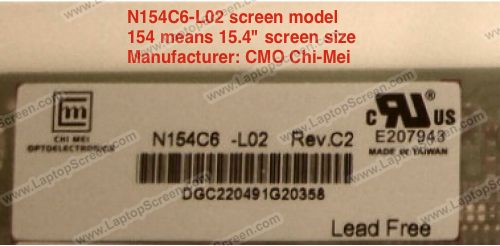
The numbers following the manufacture name will be a 3 digit number that indicates that size of the screen.
Here are a couple examples:
 |
 |
Once you find the complete model number of your screen, enter it in this search page. Click on one of the found results and the page will indicate your screen's resolution.
Back to Index
Need to contact us directly? Email Us!